3D Farm Model Laser Cut DIY Kit
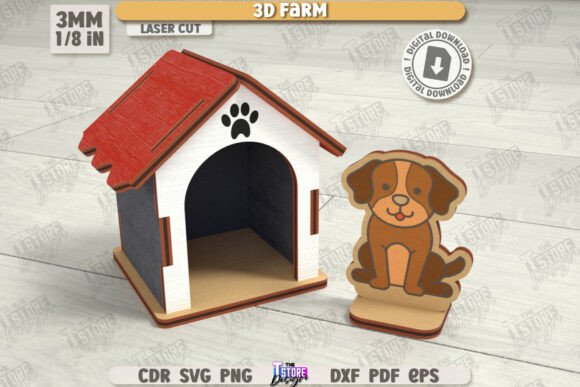
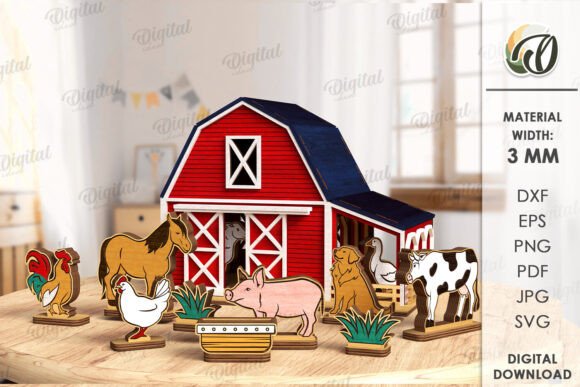
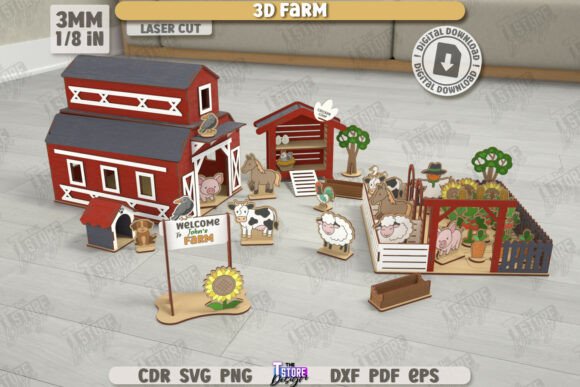
The intersection of digital design and tangible craftsmanship has never been more accessible. For those who own or operate laser cutting equipment, finding high-quality, ready-to-cut designs is often the biggest hurdle in the creative process. The 3D Farm Model Laser Cut Set DIY Model offers a streamlined solution for creators looking to produce intricate wooden structures without spending hours on CAD design. This digital product provides a complete layout for a charming farm-themed constructor, optimized specifically for precision cutting and engraving.
Understanding the value of this asset requires looking beyond the final wooden object. It is about efficiency, compatibility, and the potential for customization. Whether you are a hobbyist building a weekend project or a small business owner scaling up production, the utility of pre-prepared CNC files cannot be overstated. This guide explores how different users can leverage this farm model set to meet their specific goals, from educational tools to decorative home accents.
Why Pre-Designed CNC Files Matter
Designing a 3D interlocking model from scratch is a complex task. It involves calculating kerf width, ensuring structural integrity through friction fit, and managing layer alignment. The 3D Farm Model Laser Cut Set DIY Model eliminates these technical barriers. By providing files that are already tested and optimized, the creator allows you to focus on the material selection, finishing, and assembly rather than troubleshooting vector paths.
The package includes a comprehensive zip archive containing multiple file formats: SVG, EPS, PNG, PDF, and DXF. This variety ensures that regardless of your software preference—whether you use CorelDRAW, Illustrator, Inkscape, or specialized laser software—you have a compatible option. However, not all formats behave the same way, and understanding these nuances is critical for a successful cut.
Technical Compatibility and Best Practices
One of the most important aspects of using digital laser cut files is understanding how your specific machine interprets them. The instructions for this farm model clearly distinguish between line types: RED lines indicate CUT paths, while BLACK lines indicate ENGRAVE areas. This color-coding is a standard industry practice that simplifies the setup process in most laser control software.
For users of Lightburn, a popular choice among laser enthusiasts, there is a specific technical consideration to keep in mind. Lightburn can sometimes distort the dimensions of files, particularly when importing SVG formats. This distortion can lead to parts that do not fit together correctly, ruining the interlocking mechanism of the 3D model. To avoid this issue, it is strongly suggested to use the DXF file format instead. DXF files tend to maintain dimensional accuracy more reliably within Lightburn, ensuring that the tabs and slots of the farm model align perfectly during assembly.
If you find that the provided formats do not suit your workflow, the seller offers flexibility. You can message them to request other file types or specific color and size adjustments for PNG files. This level of support is invaluable for professionals who need exact specifications for their machinery.
Perspectives for Different Users
The appeal of the 3D Farm Model Laser Cut Set DIY Model varies significantly depending on who is using it. Here is how different groups might evaluate and utilize this digital product.
For Hobbyists and Beginners
If you are new to laser cutting, the learning curve can be steep. Beginners often struggle with design software and understanding how to prepare files for cutting. This farm model serves as an excellent starting point because it removes the design phase entirely. You can focus on learning how to set power and speed settings, how to handle materials like plywood or MDF, and how to assemble complex 3D structures. The satisfaction of completing a detailed farm scene provides immediate positive reinforcement, encouraging further exploration of the craft.
For Educators and STEM Instructors
Educators are constantly seeking hands-on projects that teach spatial reasoning, engineering principles, and patience. A 3D wooden constructor is an ideal tool for classroom settings. Students can learn about structural integrity by observing how the flat pieces interlock to form a stable 3D object. The farm theme is universally recognizable and engaging for younger audiences. Furthermore, because the files are digital, educators can print multiple sets for group activities, making it a cost-effective resource for repeated use.
For Small Business Owners and Entrepreneurs
For those selling laser-cut goods, time is money. Designing unique products takes significant effort. Using high-quality base files like this farm model allows entrepreneurs to expand their product catalog quickly. While the base design is provided, there is room for customization. You might choose to paint the finished models, add LED lighting, or bundle them with other farm-themed items. The key here is reliability; knowing that the files are tested reduces the risk of wasted material due to design errors, protecting your profit margins.
For Professional Makers and Designers
Experienced users may view this product as a time-saving component rather than a final solution. They might use the farm model as a base for more complex dioramas or integrate it into larger architectural models. The availability of vector files (SVG, DXF, EPS) allows professionals to modify the design, add custom engravings, or adjust dimensions to fit specific client requests. The emphasis on DXF for Lightburn users shows an understanding of professional workflows where precision is non-negotiable.
Evaluating Quality and Usability
When deciding if this digital product matches your needs, consider your primary priorities. If ease of use is your main concern, the pre-separated cut and engrave lines are a major benefit. If flexibility is important, the inclusion of five different file formats ensures you are not locked into one software ecosystem. For those focused on commercial value, the ability to produce a visually appealing, complex-looking product with minimal design overhead is a significant advantage.
It is also worth noting the importance of material selection. While the files dictate the shape, the quality of the final 3D Farm Model Laser Cut Set DIY Model depends heavily on the wood you choose. Thin plywood works well for detailed layers, while thicker MDF might provide more stability for larger structures. Always test cut a single piece before running the entire job to ensure your machine’s calibration matches the file’s expectations.
Making the Right Choice
Digital downloads offer instant access, but they require a certain level of technical competence to utilize effectively. If you are comfortable navigating file formats and understand the basics of laser safety and operation, this farm model set is a robust addition to your library. It bridges the gap between concept and creation, allowing you to produce a high-quality wooden constructor with confidence.
Remember to check your software compatibility before purchasing. If you use Lightburn, prioritize the DXF files to avoid dimension issues. If you need specific adjustments, do not hesitate to contact the seller, as personalized support can make a significant difference in your project’s success. By following these guidelines, you can ensure that your experience with the 3D Farm Model Laser Cut Set DIY Model is both enjoyable and productive, resulting in a beautiful piece that reflects your skill and creativity.