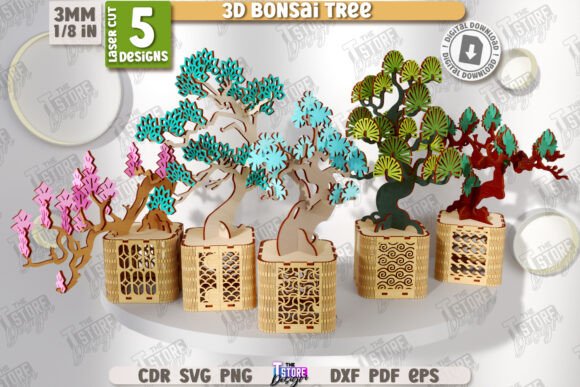
Crafting Nature: A Guide to the 3D Bonsai Tree Laser Cut Bundle CNC
In the evolving world of digital fabrication, the intersection of traditional aesthetics and modern technology creates unique opportunities for creators. One such innovation is the 3D Bonsai Tree Laser Cut Bundle CNC, a digital design package that allows hobbyists and professionals alike to construct intricate, three-dimensional botanical models from flat sheets of wood. This article explores the functionality, application, and practical considerations of using this specific laser cut bundle to bring the serene beauty of a Sakura bonsai into physical space.
Understanding the Digital-to-Physical Workflow
For those new to computer numerical control (CNC) machining or laser cutting, the concept of creating a 3D object from 2D files can seem complex. The 3D Bonsai Tree Laser Cut Bundle DIY Wooden Constructor Layout Sakura Model Plant Pot with Bonsai Tree CNC Files simplifies this process by providing pre-engineered vectors. These files are not merely images; they are precise mathematical instructions that tell your machine where to cut and where to engrave.
The core value of this product lies in its readiness. Instead of spending hours designing interlocking tabs, calculating kerf width (the material removed by the laser), and balancing structural integrity, users receive a tested layout. This allows you to focus on the creative aspects of material selection and finishing rather than the tedious engineering phase.
File Formats and Compatibility
A critical aspect of any digital download is compatibility. This bundle is designed to be versatile, catering to a wide range of software ecosystems. The zip archive includes five distinct file formats:
- SVG (Scalable Vector Graphics): Ideal for web-based design tools and many entry-level laser controllers.
- EPS (Encapsulated PostScript): A standard for professional graphic design software like Adobe Illustrator.
- DXF (Drawing Exchange Format): The gold standard for CAD software and industrial CNC machines.
- PDF (Portable Document Format): Useful for quick previews or printing templates for manual verification.
- PNG (Portable Network Graphics): Raster images helpful for visual reference or engraving-only projects.
It is crucial to note that while SVG files are popular, they can sometimes cause dimensional distortions in specific software environments. For instance, if you are working with Lightburn, a widely used laser control software, it is highly recommended to use the DXF file format instead. DXF files maintain strict geometric precision, ensuring that your bonsai tree parts fit together perfectly without scaling errors.
Decoding the Design: Red Lines and Black Lines
Upon opening the files, you will notice a color-coded system that dictates the machine's behavior. Understanding this distinction is vital for a successful build:
- RED Line – CUT: These vectors instruct the laser to cut completely through the material. These lines form the outer shapes of the leaves, branches, trunk segments, and the pot itself.
- BLACK Line – ENGRAVE: These vectors tell the laser to etch the surface without cutting through. This is typically used for adding texture to the bark, detailing the petals of the Sakura blossoms, or adding decorative patterns to the plant pot.
Before starting your project, always verify that your cutting machine and software interpret these colors correctly. Most modern software allows you to assign specific power and speed settings to different colors, automating the switch between cutting and engraving modes.
Material Selection and Assembly Considerations
The 3D Bonsai Tree Laser Cut Bundle CNC is optimized for wood, but the type of wood you choose significantly impacts the final result. Plywood, particularly birch or basswood, is a favorite among makers due to its stability and lack of grain direction issues. However, solid hardwoods can offer a more premium finish if your machine has sufficient power.
When assembling the model, patience is key. The "DIY Wooden Constructor" aspect means that the satisfaction comes from the build process. The interlocking joints are designed to be snug, but dry-fitting pieces before applying any adhesive is a best practice. This ensures that the 3D structure maintains its intended shape and that the Sakura blossoms align correctly with the branches.
Real-World Applications and Use Cases
Who benefits from this digital product? The applications extend beyond simple home decor:
- Educational Tools: Teachers can use the assembly process to demonstrate principles of geometry, engineering, and botany. It serves as a tangible example of how 2D plans translate into 3D structures.
- Small Business Inventory: Crafters selling at local markets can produce these models as high-margin items. The perceived value of a hand-assembled wooden bonsai is high, while the material cost remains low.
- Therapeutic Hobby: The repetitive, focused nature of assembling small wooden parts can be meditative. It offers a screen-free activity that results in a beautiful object.
- Architectural Models: Designers can use scaled versions of such bundles to add realistic greenery to architectural maquettes without the maintenance requirements of real plants.
Evaluating Suitability for Your Project
Before purchasing or downloading, consider your machine's capabilities. This bundle is great for laser cutting machines, but bed size matters. Ensure your machine’s work area is large enough to accommodate the largest sheet layout provided in the files. Additionally, check the thickness specifications. Most designs assume a standard material thickness (often 3mm or 1/8 inch). If your material varies significantly, you may need to adjust the tab sizes in the DXF files using CAD software.
Another consideration is the complexity of the design. The Sakura Model Plant Pot with Bonsai Tree involves multiple small parts. If you are a beginner, ensure you have fine-tipped tweezers and a well-ventilated workspace. The engraving details require a clean lens and appropriate focus to achieve crisp lines rather than burnt edges.
Limitations and Practical Expectations
While digital files offer convenience, they are not magic. The final quality depends heavily on user execution. Common issues include:
Charring: If the laser power is too high or the speed too low, the edges of the wood will darken excessively. Test cuts on scrap material are essential to dial in the right settings for your specific machine and wood type.
Fit Issues: As mentioned, Lightburn users should stick to DXF files. Users of other software should always check the scale upon import. A 1% scaling error can mean the difference between a tight joint and a loose, glue-heavy assembly.
Material Warping: Thin plywood can warp due to humidity changes. Store your cut pieces in a flat, dry environment before assembly to prevent structural twisting.
Support and Customization
One of the advantages of buying from independent digital creators is the potential for support. If you find that the provided formats do not suit your workflow, or if you need a different size for a specific project, communication is key. Many sellers, including the creator of this bundle, encourage users to reach out. You might request a different color size of PNG file for visualization purposes, or ask for a specific vector format if your older CNC machine requires it.
If you have questions about the assembly process or file interpretation, sending a message to the seller can provide clarity that generic tutorials cannot. This direct line of communication helps troubleshoot unique setup issues and ensures a better customer experience.
Conclusion
The 3D Bonsai Tree Laser Cut Bundle CNC represents a harmonious blend of nature-inspired design and digital precision. It offers a rewarding project for creators who wish to explore the capabilities of their laser cutters beyond simple signage or coasters. By understanding the file formats, respecting the cut-and-engrave distinctions, and selecting appropriate materials, you can transform a set of digital vectors into a lasting piece of art.
Whether you are a professional maker looking to expand your product line or a hobbyist seeking a challenging weekend project, this bundle provides the necessary tools to succeed. Remember to follow best practices for file handling, particularly when using software like Lightburn, and do not hesitate to seek support if customization is needed. By engaging with these digital resources, you join a community of makers who are redefining what is possible with wood and light.
Thank you for visiting my shop. Follow me, so you can see my future releases in your feed 🙂.