Evaluating the Winter and Christmas 3D Text Effect for Holiday Design
The holiday season presents a unique set of design challenges, particularly when creating assets that need to stand out in a crowded digital and print landscape. Among the various tools available to graphic designers, pre-made Winter and Christmas 3D Text Effect resources have gained significant traction. These assets, often distributed as editable Adobe Illustrator files, offer a streamlined approach to creating complex typography without starting from scratch. Understanding the utility, limitations, and technical requirements of these files is essential for designers deciding whether to integrate them into their workflow.
Understanding the Asset Structure
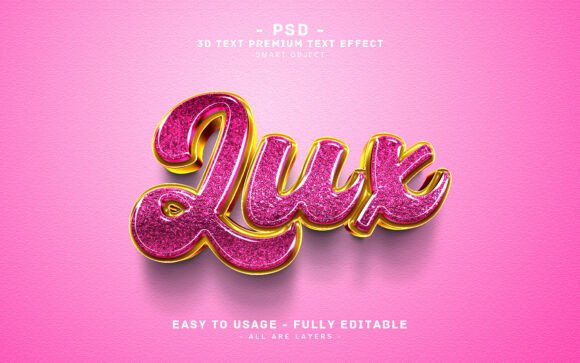
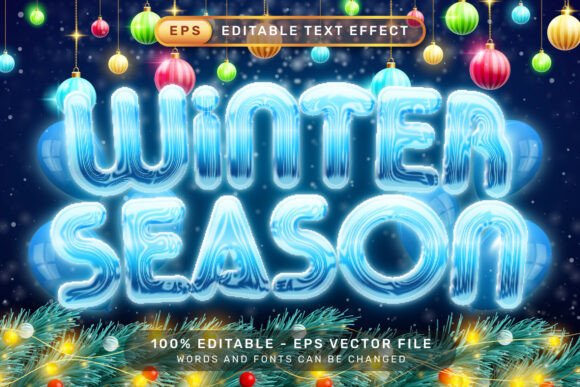
At its core, this type of resource is a vector-based template designed specifically for Adobe Illustrator. Unlike raster-based effects that rely on pixel manipulation, these files utilize scalable vector graphics (SVG) principles, typically delivered in the .EPS format. The primary appeal lies in the integration of Adobe Illustrator’s native 3D capabilities and graphic styles. When a user opens the file, they are presented with a fully constructed typographic element that mimics the appearance of snow-covered or ice-encrusted lettering.
The technical simplicity is a defining feature. The file does not require external plugins, third-party actions, or additional texture maps. Instead, it leverages the built-in "Graphic Styles" panel within Illustrator. This means the visual complexity—shadows, highlights, depth, and snow accumulation—is handled through predefined style attributes rather than manual layering. For designers who are familiar with the basic interface of Illustrator, specifically the Window – Graphic Styles menu, the learning curve is minimal. The process generally involves selecting the existing text object, typing the desired phrase, and allowing the software to automatically apply the three-dimensional transformations.
Practical Benefits for Holiday Campaigns
Time efficiency is the most immediate benefit of using a pre-configured Winter and Christmas 3D Text Effect. Creating realistic 3D typography from scratch involves multiple steps: extruding shapes, calculating lighting angles, applying gradients, and manually adding details like snowflakes or frost. A pre-made template condenses this process into seconds. For agencies handling high-volume holiday work, such as greeting cards, social media banners, or email headers, this speed can significantly impact productivity.
Another advantage is consistency. When working on a campaign that requires multiple variations of the same headline, a vector-based template ensures that every iteration maintains the exact same visual weight, perspective, and stylistic nuance. This is difficult to achieve when manually recreating effects for each new piece of copy. Furthermore, because the files are vector-based, they are resolution-independent. The included preview may be a 7000 x 4000 pixel JPG, but the actual working file can be scaled to any size without loss of quality, making it suitable for both small web icons and large-format print materials like billboards or trade show displays.
Technical Considerations and Limitations
While the ease of use is a strong selling point, there are important technical considerations to evaluate before purchasing or downloading such assets. First, compatibility is key. These effects rely on specific versions of Adobe Illustrator’s 3D engine. Older versions of the software may not render the effects correctly, or they may require updating the appearance panel manually. Designers must ensure their software version supports the specific graphic styles used in the template.
Secondly, while the text is editable, the degree of customization is bound by the original design parameters. Changing the font family is possible, but not all fonts will interact with the 3D extrusion and snow effects in the same way. A bold, sans-serif font may hold the 3D structure well, while a thin, delicate script might lose detail or appear cluttered when the snow effects are applied. Designers should test different typefaces to see how the effect adapts. If the default font does not match the brand guidelines, additional manual tweaking may be required to adjust the extrusion depth or lighting angles, which negates some of the time-saving benefits.
Additionally, these files are static in nature. They are ideal for print and static digital images, but they are not suitable for motion graphics or animated video content without significant rework in After Effects or other animation software. The "3D" aspect is a visual simulation within a 2D vector environment, not a true 3D model that can be rotated freely in real-time.
When to Use This Solution
This type of asset is a strong fit for projects with tight deadlines where high-quality visual impact is required. It is particularly useful for small business owners or freelance designers who may not have advanced skills in 3D modeling software like Cinema 4D or Blender but still want to achieve a professional, dimensional look. It is also ideal for seasonal marketing materials where the theme is explicitly wintery or festive, and the aesthetic needs to convey warmth, celebration, or cold-weather charm.
If the goal is to produce a series of holiday greetings, sale announcements, or event posters quickly, the Winter and Christmas 3D Text Effect provides a reliable foundation. The ability to simply swap out the text and export allows for rapid prototyping and iteration. For teams that need to maintain a cohesive look across multiple channels, this template serves as a standardized design element that reduces the risk of visual inconsistency.
Alternatives and Decision-Making Insights
However, there are scenarios where alternative approaches may be more appropriate. If a project requires a highly unique, custom-built typographic style that deviates significantly from standard holiday tropes, starting from scratch or hiring a specialized 3D artist may yield better results. Pre-made templates, by definition, carry the risk of looking generic if used without modification. If brand differentiation is the primary goal, relying solely on a popular template might dilute the brand’s unique voice.
Furthermore, if the final output requires interactive 3D elements or complex animations, investing time in learning dedicated 3D software or using web-based 3D CSS libraries might be a better long-term investment. While the Illustrator template is easy to use, it is limited to static visuals. Designers should assess whether the static nature of the file aligns with their distribution channels. For social media stories or video ads, a static image may not engage the audience as effectively as motion graphics.
In conclusion, the decision to use a Winter and Christmas 3D Text Effect EPS file should be based on a balance of time constraints, technical skill level, and project requirements. It offers a powerful shortcut for creating polished, festive typography with minimal effort. By understanding its capabilities and limitations, designers can leverage this tool effectively to enhance their holiday design portfolios while maintaining professional standards and efficiency.