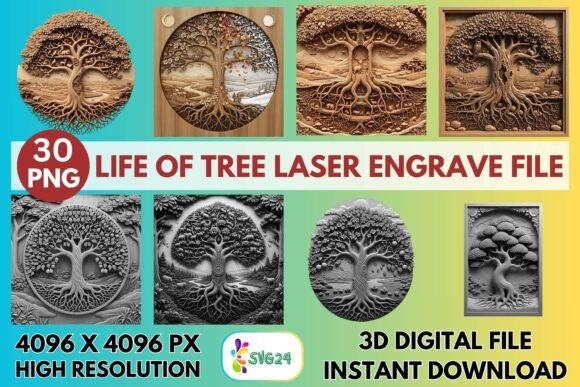
3D Life of Tree Laser Engrave File
Nature has always been a profound source of inspiration for artists and makers, but capturing its organic complexity in a rigid digital format can be challenging. The 3d Life of Tree Laser Engrave File bridges this gap, offering a sophisticated solution for creators who want to bring the intricate beauty of arboreal forms into their physical projects. This is not merely a clipart image; it is a precision-engineered grayscale map designed specifically for laser engraving technology. By translating the delicate interplay of light and shadow found in tree roots, bark, and branches into high-resolution pixel data, this file allows your machine to carve depth and texture into flat surfaces with remarkable accuracy.
For hobbyists, small business owners, and professional designers alike, understanding how to leverage these files can transform standard wooden blanks or acrylic sheets into stunning pieces of art. The key lies in recognizing that laser engraving is a subtractive process that relies on contrast. The varying shades of gray in the provided PNG files dictate how much power the laser applies at any given point. Darker areas burn deeper and darker, while lighter areas remain closer to the surface. This gradient capability is what gives the "3D" effect, creating an illusion of volume and realism that simple line art cannot achieve.
Unlocking Creative Potential in Home Décor
One of the most compelling applications for this design is in the realm of home décor. A tree symbolizes growth, stability, and connection, making it a timeless motif for wall art. When engraved on light-colored wood such as birch, maple, or basswood, the natural grain complements the organic lines of the tree. The result is a piece that feels both rustic and refined. Imagine a large circular slice of wood featuring the full canopy and root system of the tree, hung in a living room or entryway. The high resolution of the 4096×4096 px files ensures that even when scaled up, the fine details of individual leaves and twisting roots remain crisp, avoiding the pixelation that plagues lower-quality images.
Beyond wall hangings, consider functional décor items. Coasters engraved with segments of the tree’s root system offer a subtle, earthy aesthetic to coffee tables. Because the file includes transparent backgrounds, you can easily isolate specific parts of the design—such as just the trunk or a cluster of branches—to fit smaller surfaces without losing visual impact. This flexibility allows for cohesive sets where each item features a different element of the same overarching nature theme, creating a curated look throughout a space.
Elevating Personalized Gifts and Symbolic Art
In the gift market, personalization is paramount. The 3d Life of Tree Laser Engrave File serves as an excellent base for customizable projects. While the core file is non-editable regarding its internal structure, its transparent background makes it easy to layer with text or other vector elements in your design software. For instance, you might engrave the tree on a wooden plaque and add a family name or a significant date beneath the roots, symbolizing heritage and foundation. This approach works beautifully for wedding gifts, anniversary presents, or memorial keepsakes.
The symbolic weight of the tree also lends itself well to inspirational signage. Entrepreneurs and educators can use these designs to create office decor that promotes values like growth, resilience, and community. When engraved on slate or dark-stained wood, the contrast shifts, offering a more dramatic and modern appearance. The versatility of the grayscale format means you are not locked into one aesthetic; by adjusting the brightness and contrast settings in your laser software, you can tweak the final look to be softer and more ethereal or bold and high-contrast, depending on the recipient’s taste.
Technical Precision for Professional Results
To truly capitalize on the quality of these files, understanding the technical side of laser engraving is essential. The set includes both coloring and grayscale PNGs, but for most laser applications, the grayscale versions are superior. They provide the nuanced tonal range necessary for photorealistic results. Whether you are using a Glowforge, LightBurn, xTool, Sculpfun, or OMTech machine, the principle remains the same: the laser interprets black as maximum power and white as minimum power.
For users of Glowforge machines, recommended settings often involve a speed of 1000 and power of 90 in Grayscale mode, with "Vary Power" enabled. This ensures the laser modulates its output smoothly across the gradients. Setting the Lines Per Inch (LPI) to around 270 provides a dense enough scan pattern to eliminate banding, resulting in smooth transitions between shades. It is crucial to test these settings on scrap material first, as different woods have varying densities and resin contents that affect how they absorb laser energy.
If you are operating with LightBurn, the Jarvis dithering algorithm is highly recommended for best detail. This method distributes the dots in a way that mimics continuous tones, enhancing the 3D effect. Always ensure your material is clean and flat; any warping can change the focal distance of the laser, leading to inconsistent engraving depth. Since the files are optimized for CO₂ lasers, they perform exceptionally well on organic materials like wood, leather, and paper, as well as coated metals and certain plastics.
Adapting Designs for Various Materials
While wood is the traditional choice, do not limit your creativity to timber. The 3d Life of Tree Laser Engrave File shines on leather, where the laser burns away the top dye layer to reveal the lighter hide beneath, creating a rich, tactile contrast. This is ideal for journal covers, wallet inserts, or keychains. On acrylic, particularly two-tone acrylic, the laser removes the top colored layer to expose the core color, producing a sharp, clean image that looks professionally manufactured. Paper enthusiasts can use lower power settings to etch intricate tree patterns onto cardstock for high-end invitations or bookplates.
Textile applications are also possible, though they require careful calibration. Engraving on denim or canvas can create unique fashion statements or tote bags. The key here is to use a lower power setting to avoid burning through the fabric, aiming instead for a surface scorched effect that highlights the tree’s silhouette. Each material reacts differently, so maintaining a log of your settings for each substrate will help you build a reliable reference library for future projects.
Best Practices for Consistency and Quality
Consistency is the hallmark of a professional maker. When using these high-resolution files, ensure that your lens is clean and your mirrors are aligned if you are using a gantry-style machine. Dust and debris can scatter the laser beam, reducing the clarity of the fine details in the tree’s branches. Additionally, because resizing is the buyer’s responsibility, always maintain the aspect ratio when scaling the image to prevent distortion. Stretching the image can compress the details, making the intricate roots look muddy or the leaves appear unnatural.
Remember that these are digital assets intended for immediate use. They are not editable vector files, so you cannot change the shape of the tree itself. However, this constraint can be viewed as a benefit—it ensures that the artistic integrity of the original design is preserved. Your creativity comes into play through material selection, finishing techniques, and composition. Applying a clear coat or wax after engraving can enhance the contrast and protect the surface, making the colors pop and giving the piece a polished, gallery-ready finish.
By integrating the 3d Life of Tree Laser Engrave File into your workflow, you gain access to a tool that simplifies the creation of complex, nature-inspired art. It allows you to focus on the craft and the customer experience rather than spending hours designing intricate textures from scratch. Whether you are creating a single heartfelt gift or building a product line for your Etsy shop, this resource provides the foundational quality needed to make your work stand out in a crowded marketplace.